The app executable selects a process identity, reads a TOML or XML application manifest and loads its plugin libraries. Start with the runnable Sample1 quick start; this page explains configuration paths, library names and startup checks.
Command-line arguments
| Argument | Required | Meaning |
|---|---|---|
--busid / -b |
Yes | Logical process Bus address, such as 1.0.1.1; this is not a socket bind address |
--name / -n |
Yes | Application name, also used in the log filename |
--app_conf / -a |
Yes | TOML application manifest with the lowercase .toml extension, or a legacy XML *.app.conf file |
--log_conf / -l |
No | Logger configuration; defaults to ./conf/log.conf |
--help / -h |
No | Print the launcher’s argument reference |
./bin/app --busid=1.0.1.1 --name=sample1 \
--app_conf=conf/sample1.app.conf --log_conf=conf/log.confbusid, name and app_conf must be supplied explicitly. The Bus reference describes the address fields. Use the executable’s --help output for additional platform-specific flags.
Resolve configuration paths
Relative paths resolve from the process working directory. Moving the executable or placing the manifest in another folder does not change that base directory.
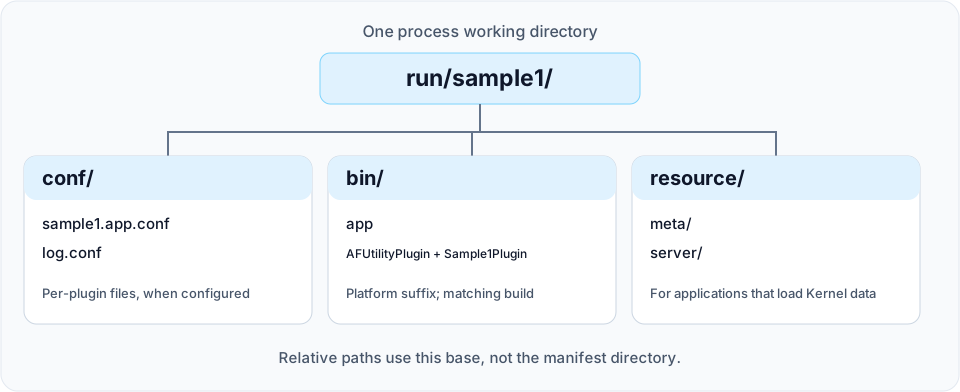
| Input | How it is selected | Example from the runtime directory |
|---|---|---|
| Application manifest | --app_conf |
conf/sample1.app.conf |
| Logger settings | --log_conf, or its default |
conf/log.conf |
| Plugin libraries | TOML plugin_library_dir or XML plugin_lib_dir, plus the library filename |
bin/Sample1Plugin.dylib on macOS Release |
| Per-plugin settings | TOML plugin_config_dir + config, or XML plugin_conf_dir + conf |
conf/my-plugin.conf when the filename is my-plugin.conf |
| Kernel metadata and configuration | The Kernel’s resource/ directory |
resource/meta/entity_class.config, resource/server/item.config |
The launcher passes the per-plugin path to the plugin manager; each module decides how to read its own configuration. Kernel resource paths are separate from the application manifest and are needed only by applications that use those Kernel facilities. See Data-driven configuration and Configuration tools.
Select plugins
For a new manifest, use TOML. The equivalent of Sample1’s XML configuration is checked in as sample1.app.toml:
[application]
plugin_library_dir = "bin/"
plugin_config_dir = "conf/"

[[plugins]]
name = "AFUtilityPlugin"

[[plugins]]
name = "Sample1Plugin"
Pass --app_conf=conf/sample1.app.toml to select it. The application table is required; directory fields are optional strings. Each plugin requires a unique, nonempty name; its optional config string selects a per-plugin file. See Application manifests for validation rules and format boundaries. Bus, logger and business-resource configuration formats are unchanged.
Existing XML manifests
The checked-in Sample1 manifest loads a utility plugin and one sample plugin:
<xml>
    <plugins plugin_lib_dir="bin/" plugin_conf_dir="conf/">
        <plugin name="AFUtilityPlugin" conf="" />
        <plugin name="Sample1Plugin" conf="" />
    </plugins>
</xml>- Keep the outer
xmlelement: the launcher looks for itspluginschild. - Keep the trailing separator in directory prefixes such as
bin/andconf/; the current loader concatenates strings. - Use the library stem in
name, without a platform suffix or alibprefix. The loader appends.dll,.soor.dylib; Debug builds also append_dbefore the suffix. - An empty
confvalue supplies no per-plugin filename. Sample1 does not need a separatesample1.conffile.
Copy the executable and selected plugin libraries from the same build. Keep Debug and Release artifacts in separate runtime directories. The plugin list is not a dependency-order contract: modules should resolve their dependencies through the module API, rather than rely on entry order.
Check startup and stop the process
For Sample1, look for a log entry containing sample1_module and PostInit. This identifies entry into the sample’s post-initialization callback, which registers its timer.
On macOS/Linux, Ctrl+C or SIGTERM requests shutdown through the application’s main loop. On Windows, enter exit in the application console. Sample1 logs PreShut and then Shut during orderly shutdown. This sample check is not a readiness or shutdown guarantee for every plugin combination.
Troubleshoot startup
| Symptom | Check |
|---|---|
Usage text or Application parameter is invalid |
Supply all three required arguments; check spelling with --help |
| Manifest loading fails | Check the working directory, explicit path and format; a lowercase .toml suffix selects TOML, while legacy *.app.conf files use XML |
| Logger configuration cannot be read | Check the working directory and --log_conf path |
Load shared library[...] failed |
Check TOML plugin_library_dir or XML plugin_lib_dir, platform suffix, Debug suffix and the library’s dependent shared libraries |
| Plugin loads but the expected module is unavailable | Check registration, enabled targets and required plugins; see Create a plugin |
| Kernel metadata or configuration is missing | Stage the generated resource/meta/ and resource/server/ files in the process working directory |
The launcher implementation is in main.cpp. Review existing multi-process scripts before adopting them: some retain older deployment paths and service assumptions.