Local Results
Charts below use the UDP performance report.
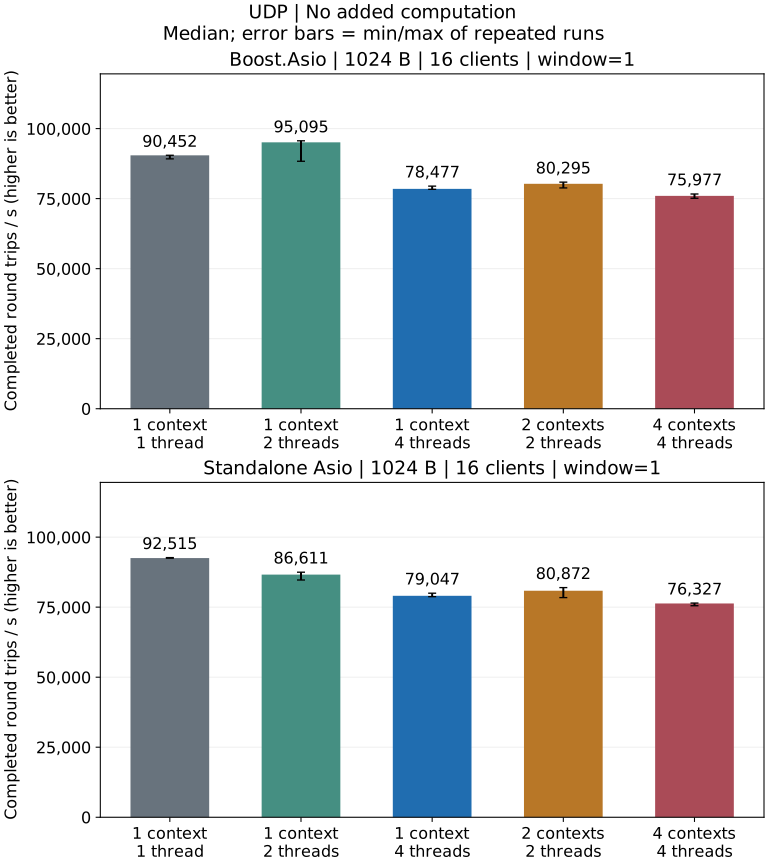
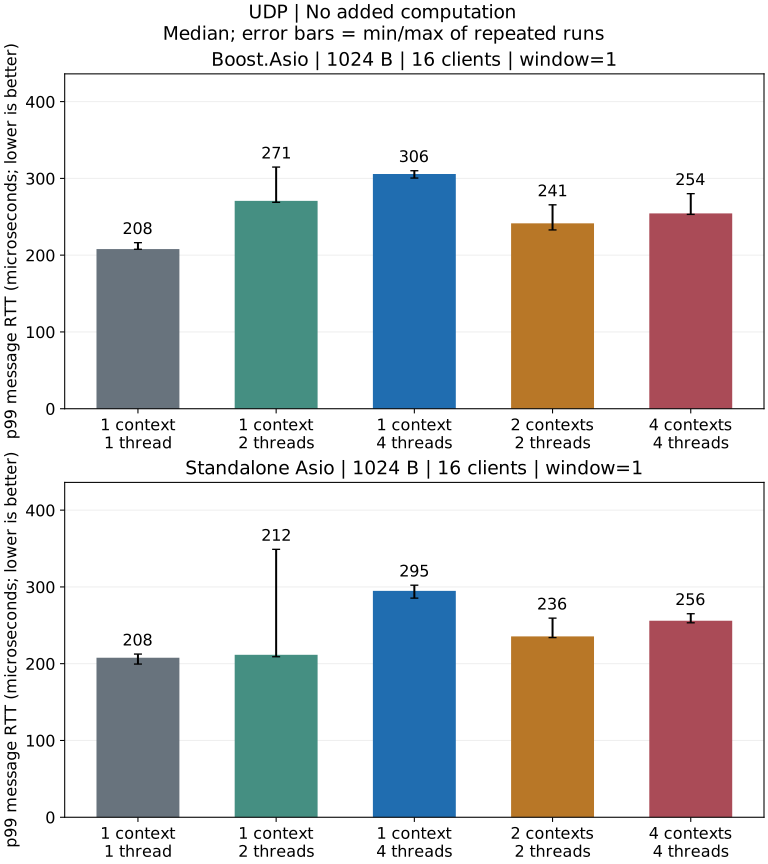
Release local loopback: 1024-byte datagrams, 16 clients, window 1 and no extra application computation.
What This Run Shows
- Standalone has the highest throughput median with one context/one thread. Boost gains some throughput with two threads, at higher p99 latency and CPU use.
- One context/four threads and four contexts/one thread each have lower throughput medians than one context/one thread. The server uses one socket and a serialized receive lane; extra threads cannot execute its receive callbacks concurrently.
Complete UDP report · Test environment and diagnosis · Metrics and statistics
Build and Run
Run from the repository root with a Release build. Replace the Asio include path
with -DARKNET_USE_BOOST_ASIO=ON to test Boost under the same conditions.
Commands assume a single-configuration generator. With Visual Studio, add
--config Release to the build command and run the executable under
benchmarks/Release/. Windows executables end in .exe.
cmake -S . -B build-perf -DCMAKE_BUILD_TYPE=Release \
  -DARKNET_BUILD_BENCHMARKS=ON -DARKNET_ENABLE_SSL=OFF \
  -DARKNET_USE_BOOST_ASIO=OFF -DARKNET_ASIO_INCLUDE_DIR=/path/to/asio/include
cmake --build build-perf --target arknet_loopback_benchmark --parallel 3
build-perf/benchmarks/arknet_loopback_benchmark \
  --protocol udp --payload 1024 --clients 16 --window 1 \
  --io-model shared --io-threads 1 --work 0 --warmup 0.25 --seconds 1
This configuration sends 1024-byte datagrams from 16 clients, with one
outstanding message per client and one context/one thread. It writes JSON to
standard output. Repeat each configuration three times in fresh processes.
Change --io-threads to 2 or 4 for a shared context, or use
--io-model sharded --io-threads 4 for four contexts/one thread each.
--work 10000 adds 10,000 deterministic iterations to each server echo;
0 adds no application computation. The complete shell matrix is in
Testing.
The benchmark program requests a 65536-byte socket send buffer and a 4 MiB receive buffer for its UDP endpoints. JSON reports the actual OS values, including client minimum/maximum sizes; these may be clamped. This is benchmark setup, not a change to arknet’s socket defaults.
Probe a Larger Window
Use --udp-server-receive-buffer BYTES to vary server receive capacity independently. For application settings, see Buffers and flow control.
Run an explicit high-window case to expose queueing or loss under a more aggressive offered load:
build-perf/benchmarks/arknet_loopback_benchmark \
  --protocol udp --payload 1024 --clients 16 --window 16 \
  --io-model shared --io-threads 4 --work 0 --warmup 1 --seconds 3
Datagram Size and MTU
| Ordinary UDP payload | IPv4 | IPv6 |
|---|---|---|
| Protocol maximum | 65,507 bytes | 65,527 bytes |
| Without fragmentation at MTU 1,500 | 1,472 bytes | 1,452 bytes |
| Mathematical budget at MTU 16,384 | 16,356 bytes | 16,336 bytes |
These budgets assume no IP options or extension headers and exclude IPv6 jumbograms. IPv4 and IPv6 use different IP headers; these sizes are not interchangeable.
The IPv4 boundary and burst-loss report shows 36 passing and 18 failing runs per dependency configuration at 16 clients/one context/one thread. 65,507-byte messages pass at window 1; 16 KiB passes at window 16 but loses 767 echoes per run at window 64. Socket buffer drops increase by 23,778 per dependency configuration while IPv4 fragmentation/reassembly counters stay at zero. The local MTU calculation therefore does not establish fragmentation as the loss cause. These results do not measure IPv6 loss or cross-host behavior.
The IO measurements use UDP window 1 while TCP and WebSocket use window 16, so these results do not support a direct capacity ranking across protocols; loss invalidates a larger-window measurement. Broadcast, multicast, DTLS and cross-host networks are outside this test; RUDP has a separate report. Validate pacing, loss, reordering and MTU on the deployed network.
See testing, IO models and benchmark source.